핵심 아이디어: 스냅샷 비교
변동 감지의 핵심은 단순하다. “방금 가져온 데이터"와 “지난번에 저장해둔 데이터"를 비교한다.
- 새로 생긴 항목 → 추가 알림
- 사라진 항목 → 취소 알림
이 상태를 snapshot.json에 저장해두면 서버가 재시작돼도 이전 상태를 그대로 복구할 수 있다.
스냅샷 구조
{
  "vacations": [
    {
      "id": "unique-key",
      "name": "홍길동",
      "date": "2026-04-03",
      "type": "연차"
    }
  ],
  "rooms": [
    {
      "id": "unique-key",
      "title": "주간 회의",
      "room": "중회의실",
      "start": "2026-04-03T10:00:00",
      "end": "2026-04-03T11:00:00"
    }
  ],
  "updatedAt": "2026-04-03T08:50:00.000Z"
}
변동 감지 로직
function detectChanges(prev, curr, keyFn) {
  const prevMap = new Map(prev.map(item => [keyFn(item), item]));
  const currMap = new Map(curr.map(item => [keyFn(item), item]));

  const added   = curr.filter(item => !prevMap.has(keyFn(item)));
  const removed = prev.filter(item => !currMap.has(keyFn(item)));

  return { added, removed };
}
keyFn으로 각 항목의 고유 키를 만든다. 휴가는 사번+날짜, 회의실은 예약ID 같은 식이다.
// 휴가 변동 감지
const vacationChanges = detectChanges(
  snapshot.vacations,
  freshVacations,
  v => `${v.id}_${v.date}`
);

// 회의실 변동 감지
const roomChanges = detectChanges(
  snapshot.rooms,
  freshRooms,
  r => r.id
);
회의실 변동 감지 주의점
회의실은 한 가지 함정이 있다. API가 요청한 날짜 범위보다 더 넓은 데이터를 반환하는 경우가 있어서, 날짜가 바뀌는 시점에 오탐이 발생했다.
예를 들어 오늘 오후 11시에 내일 예약이 새로 잡혔는데, 내일 예약은 아직 어제 스냅샷에 없으니 “추가됨"으로 오탐하는 것이다.
해결: 날짜가 바뀐 경우 회의실 비교를 건너뛴다.
const snapshotDate = snapshot.updatedAt?.slice(0, 10);
const today = new Date().toISOString().slice(0, 10);

// 날짜가 같을 때만 변동 비교 (날짜 변경 시 오탐 방지)
if (snapshotDate === today) {
  const roomChanges = detectChanges(snapshot.rooms, freshRooms, r => r.id);
  if (roomChanges.added.length || roomChanges.removed.length) {
    await notifyRoomChanges(roomChanges);
  }
}
스냅샷 저장
변동 감지 후 현재 상태를 스냅샷으로 저장한다.
async function saveSnapshot(vacations, rooms) {
  const snapshot = {
    vacations,
    rooms,
    updatedAt: new Date().toISOString(),
  };
  await fs.writeFile(SNAPSHOT_PATH, JSON.stringify(snapshot, null, 2));
}
node-cron 스케줄러 구성
const cron = require('node-cron');

// 10분마다: 변동 감지
cron.schedule('*/10 * * * *', () => syncAndCheckChanges());

// 월요일 09시: 이번 주 전체 휴가자
cron.schedule('0 9 * * 1', () => sendVacationWeekly());

// 화~금 09시: 당일 휴가자
cron.schedule('0 9 * * 2-5', () => sendVacationDaily());

// 월~금 09시: 당일 회의실 예약
cron.schedule('0 9 * * 1-5', () => sendRoomDaily());

// 월~금 09시: 출근 미등록자 DM
cron.schedule('0 9 * * 1-5', () => sendCommuteAlert());

// 30분마다: 세션 keepalive
cron.schedule('*/30 * * * *', () => keepSession());

// 월요일 00시: 로그 초기화
cron.schedule('0 0 * * 1', () => resetLog());
타임존 주의: node-cron의 기본 타임존은 시스템 타임존을 따른다. Docker 컨테이너 기본값은 UTC라서
.env에TZ=Asia/Seoul을 설정하지 않으면 알림이 9시간 늦게 발송된다.
크론 설정을 파일로 관리
크론 스케줄을 코드에 하드코딩하면 수정할 때마다 재배포해야 한다. settings.json에 저장해서 관리자 페이지에서 수정 가능하게 했다.
{
  "crons": {
    "sync":           { "enabled": true,  "schedule": "*/10 * * * *" },
    "vacationWeekly": { "enabled": true,  "schedule": "0 9 * * 1" },
    "vacationDaily":  { "enabled": true,  "schedule": "0 9 * * 2-5" },
    "roomDaily":      { "enabled": true,  "schedule": "0 9 * * 1-5" },
    "commute":        { "enabled": true,  "schedule": "0 9 * * 1-5" },
    "sessionKeep":    { "enabled": true,  "schedule": "*/30 * * * *" },
    "logReset":       { "enabled": true,  "schedule": "0 0 * * 1" }
  }
}
서버 시작 시 이 파일을 읽어서 크론을 동적으로 등록한다.
const settings = JSON.parse(await fs.readFile(SETTINGS_PATH));
const cronJobs = {};

for (const [id, config] of Object.entries(settings.crons)) {
  if (!config.enabled) continue;
  cronJobs[id] = cron.schedule(config.schedule, cronHandlers[id]);
}
Slack Webhook 알림 발송
기본 발송
async function sendWebhook(webhookUrl, message) {
  await axios.post(webhookUrl, { text: message });
}
팀별 알림 타입 필터링
팀마다 받고 싶은 알림 타입이 다를 수 있다. teams.json에서 각 팀의 활성화된 타입만 발송한다.
{
  "teams": [
    {
      "name": "개발팀",
      "webhook": "https://hooks.slack.com/...",
      "enabled": true,
      "alertTypes": {
        "vacationChange": true,
        "vacationDaily": true,
        "roomChange": false,
        "roomDaily": true,
        "commute": false
      },
      "deptIds": ["0001", "0002"]
    }
  ]
}
async function notifyByType(type, message) {
  const teams = settings.teams.filter(
    t => t.enabled && t.alertTypes[type]
  );
  for (const team of teams) {
    await sendWebhook(team.webhook, message);
  }
}
같은 Webhook 중복 발송 방지
여러 팀이 같은 Webhook URL을 쓰는 경우가 있다. 그냥 발송하면 같은 채널에 동일한 알림이 여러 번 온다.
function dedupeByWebhook(teams) {
  const seen = new Set();
  return teams.filter(team => {
    if (seen.has(team.webhook)) return false;
    seen.add(team.webhook);
    return true;
  });
}

async function notifyByType(type, message) {
  const teams = dedupeByWebhook(
    settings.teams.filter(t => t.enabled && t.alertTypes[type])
  );
  for (const team of teams) {
    await sendWebhook(team.webhook, message);
  }
}
Slack 슬래시 커맨드
슬래시 커맨드는 Slack이 POST 요청을 서버로 보내는 방식이다. 3초 안에 응답하지 않으면 타임아웃이 난다.
app.post('/slack/command', async (req, res) => {
  const { command, text, channel_id } = req.body;

  // Slack에 일단 빈 응답 먼저 → 3초 타임아웃 방지
  res.json({ response_type: 'ephemeral', text: '조회 중...' });

  // 실제 처리는 비동기로
  const result = await handleCommand(command, text, channel_id);
  await axios.post(req.body.response_url, {
    response_type: 'in_channel',
    text: result,
  });
});
날짜 파싱
function parseDate(text) {
  if (!text || text === '오늘') return [today(), today()];
  if (text === '내일') return [tomorrow(), tomorrow()];
  if (text === '이번주') return [monday(), friday()];
  if (text.includes('~')) {
    const [start, end] = text.split('~').map(s => s.trim());
    return [start, end];
  }
  // 날짜 직접 입력: '2026-04-03'
  return [text.trim(), text.trim()];
}
채널 기반 팀 매칭
채널 ID로 어느 팀 채널인지 파악해서 해당 팀 휴가자만 보여준다.
function getTeamByChannel(channelId) {
  // 1. 채널 ID로 팀 매칭
  const team = teams.find(t => t.channelId === channelId);
  if (team) return team;

  // 2. 실패 시 → 사용자 Slack 이름에서 팀 추출
  // 3. 그것도 실패 시 → 전체 팀 그룹핑해서 표시
  return null;
}
메시지 포맷 예시
당일 휴가자
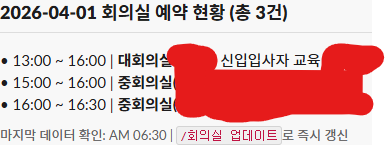
회의실 예약 현황
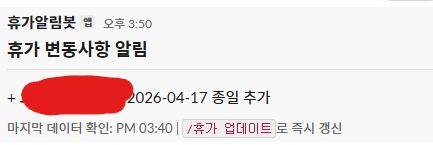
휴가 변동 알림
정리
- 스냅샷 비교로 변동 감지 → DB 없이 JSON 파일만으로 충분
- 회의실 변동은 날짜가 바뀌는 시점에 오탐 주의, 날짜 동일할 때만 비교
- node-cron 타임존은 반드시 확인, Docker면
TZ=Asia/Seoul필수 - 슬래시 커맨드는 3초 타임아웃 때문에 즉시 응답 후 비동기 처리
- 같은 Webhook URL 중복 발송은 dedup 처리
다음 편에서는 관리자 페이지 구현과 Docker 배포, 실제 겪은 트러블슈팅을 다룬다.